

AEO & GEO vs SEO: What's the Difference?
Understand the difference between AEO, GEO and SEO, and why it matters to your brand.
October 14, 2026

Google is making a significant change to how GA4 and Google Ads share data on 15 June 2026. For ecommerce brands, it has direct implications for measurement accuracy — even if you set up Consent Mode V2 back in 2024 and haven't thought about it since.
This post explains what's changing, why it matters, and what to check before the deadline.
From 15 June 2026, Google Ads will rely exclusively on ad_storage consent signals. GA4 is being removed from the equation when it comes to Ads data flow.
In plain English: if a user visits your site and hasn't explicitly granted ad_storage consent — and that signal hasn't been correctly configured and passed to Google — Google Ads will receive no usable data about that user beyond basic URL information.
This affects:
It's worth being clear about what this is and isn't. It's not a paid ads setup issue — it's a tagging and implementation issue. The consent signal has to exist, fire at the right point in the page load, and be correctly configured. If any part of that chain is broken, the data doesn't flow.
Most brands that went through GA4 migration did implement Consent Mode V2 — usually around the March 2024 enforcement deadline. The problem is that implementing it and implementing it correctly are two different things.
In our experience auditing GA4 properties, a significant proportion of consent mode setups have issues that are invisible in day-to-day reporting. GA4 keeps collecting data. Everything looks normal. The problem only surfaces when you look closely — or when a change like this one exposes the gap.
The most common issues we find:
The consent signal fires after the tags, not before. Consent mode only works if Google tags load first and receive the consent state before firing. If your CMP triggers after the tag, the default state — usually denied — is what gets passed.
The CMP is live but not correctly connected to GTM. Having a cookie banner is not the same as having a working consent mode implementation. The CMP needs to be actively communicating consent state to your tag management system in real time.
Basic mode was deployed instead of Advanced. Basic mode blocks tags from firing until consent is granted. Advanced mode allows cookieless pings to fire regardless, which enables GA4's behavioural modelling for non-consenting users. Many brands intended to implement Advanced but ended up with Basic — or something in between.
Not all four required parameters are present. Consent Mode V2 requires four signals: analytics_storage, ad_storage, ad_user_data, and ad_personalization. We frequently find setups missing one or two of these, which means the implementation is incomplete regardless of what the banner says.
None of these issues typically produce error messages or obvious anomalies in your GA4 reports. Data continues to flow. Conversion numbers look plausible. There's nothing flagging a problem.
The only reliable way to identify these issues is to audit the implementation directly — checking how and when consent signals fire, what state they're passing, and whether all four parameters are correctly configured for your property.
GA4 does have a Consent Settings panel within Data Streams (Admin > Data collection and modification > Consent settings) which can show whether signals are being received. If you see "Action required" labels there, that's a clear sign. But a clean panel doesn't guarantee everything is working correctly end to end.
Step 1: Check your Consent Settings in GA4 Admin. Go to your data stream and look at Consent Settings. Any "Action required" label is a red flag that needs addressing immediately.
Step 2: Check which mode is deployed — Basic or Advanced. This should be visible in your GTM setup. If you're not sure, it's worth finding out. Advanced mode is recommended for most ecommerce setups.
Step 3: Verify the signal timing. Use GTM Preview mode or a tool like Tag Assistant to confirm that consent signals fire before your GA4 and Ads tags, not after.
Step 4: Confirm all four parameters are present. Your consent mode implementation should be passing analytics_storage, ad_storage, ad_user_data, and ad_personalization. Check your GTM consent initialisation trigger and variables.
Step 5: If in doubt, get it audited. Consent mode is one of the areas we cover as part of every GA4 audit. If you haven't had your setup reviewed recently, now — with six weeks until the deadline — is the right time.
This change is part of a broader direction of travel from Google. Consent is no longer a legal box to tick — it directly affects the quality and completeness of your measurement data. As privacy regulations tighten and third-party data becomes less available, the brands with clean, correctly configured first-party data collection will have a significant advantage.
Getting consent mode right isn't just about compliance. It's about making sure your analytics reflects what's actually happening on your site, so the decisions you make — on spend, on CRO, on product — are based on something you can trust.
If you'd like us to check your consent mode implementation, get in touch or find out more about our GA4 audit.
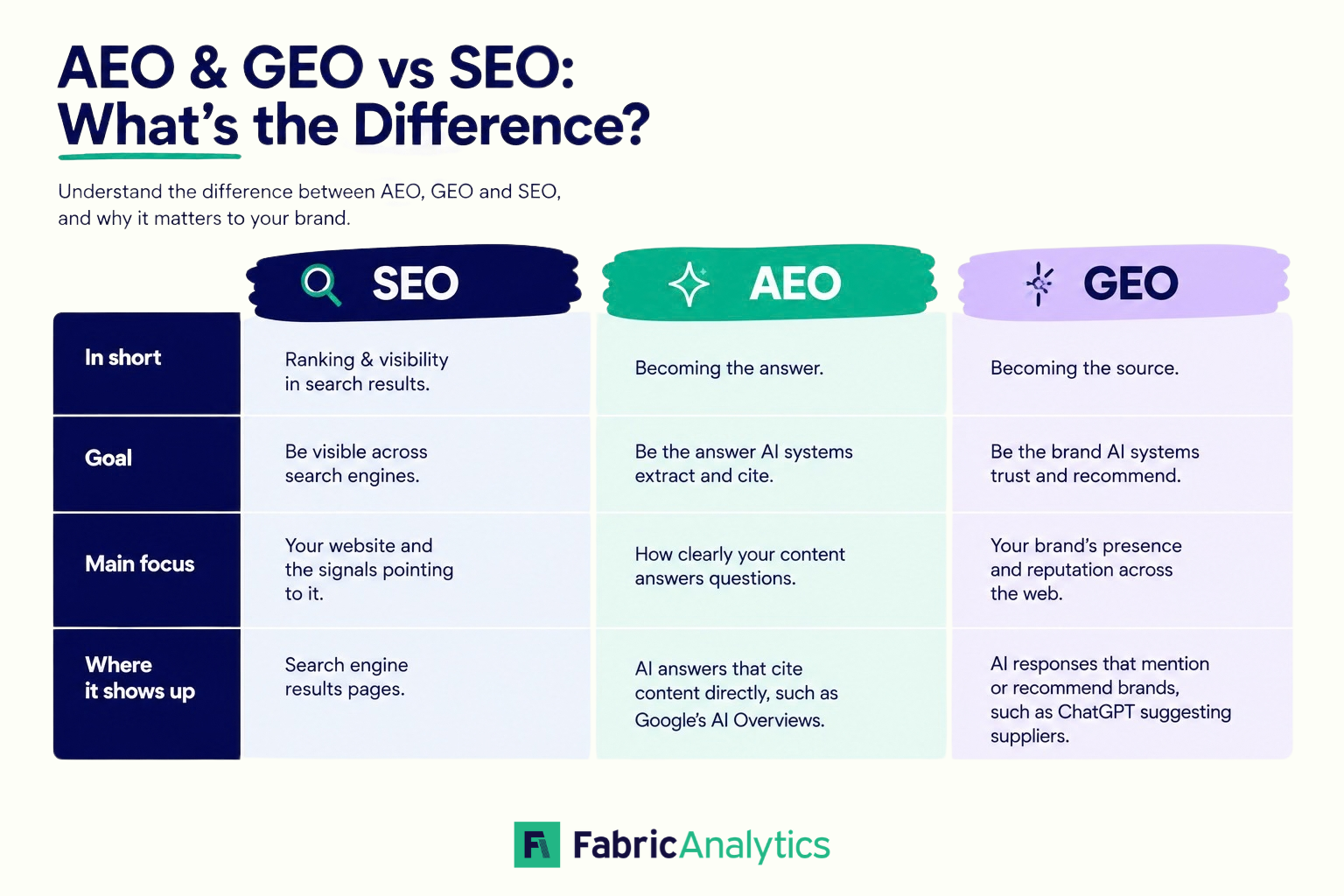
Understand the difference between AEO, GEO and SEO, and why it matters to your brand.
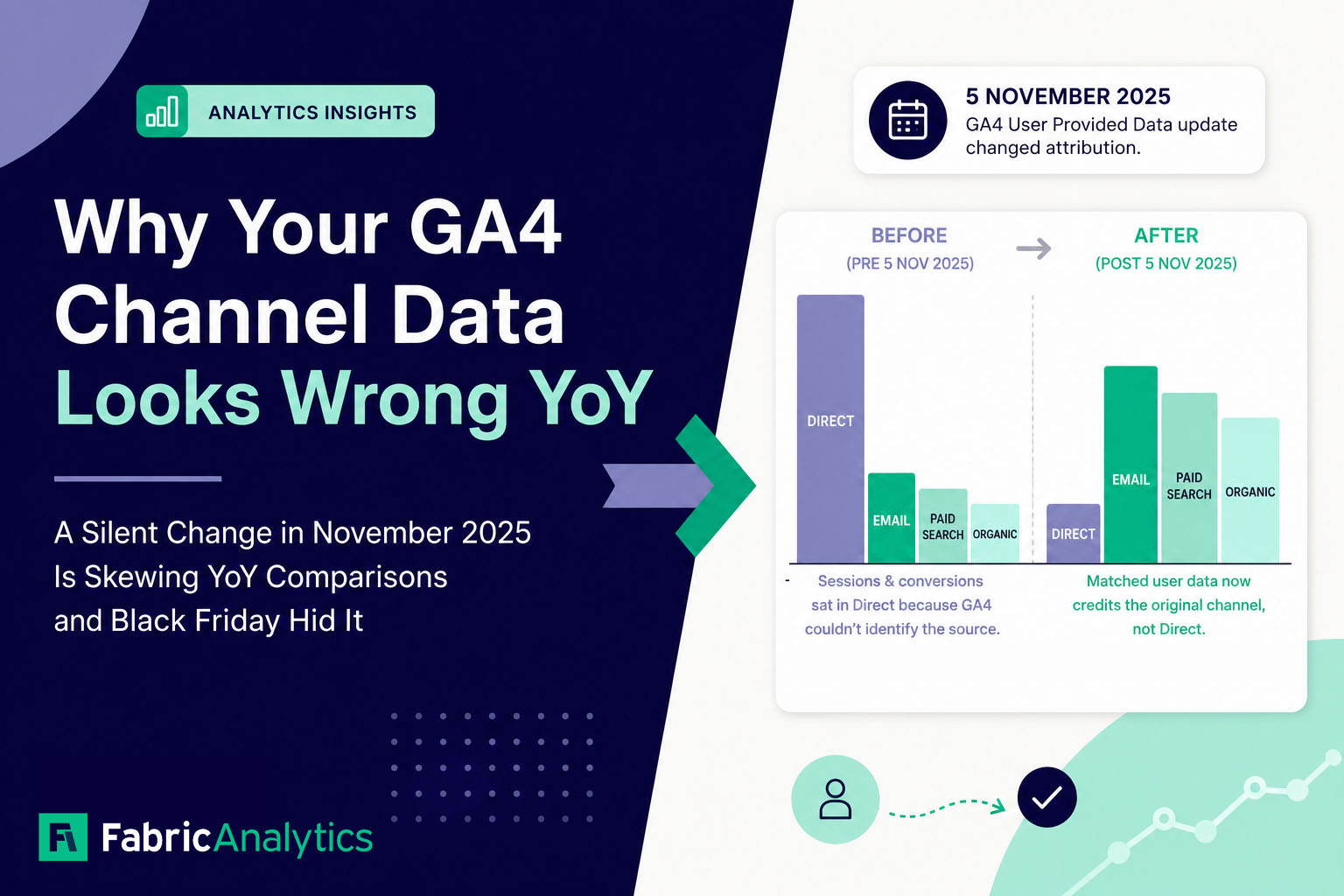
A little-publicised GA4 update in November 2025 changed how traffic is attributed, making YoY channel comparisons misleading for many businesses. Here's what changed, how to spot it, and what it means for your reporting.
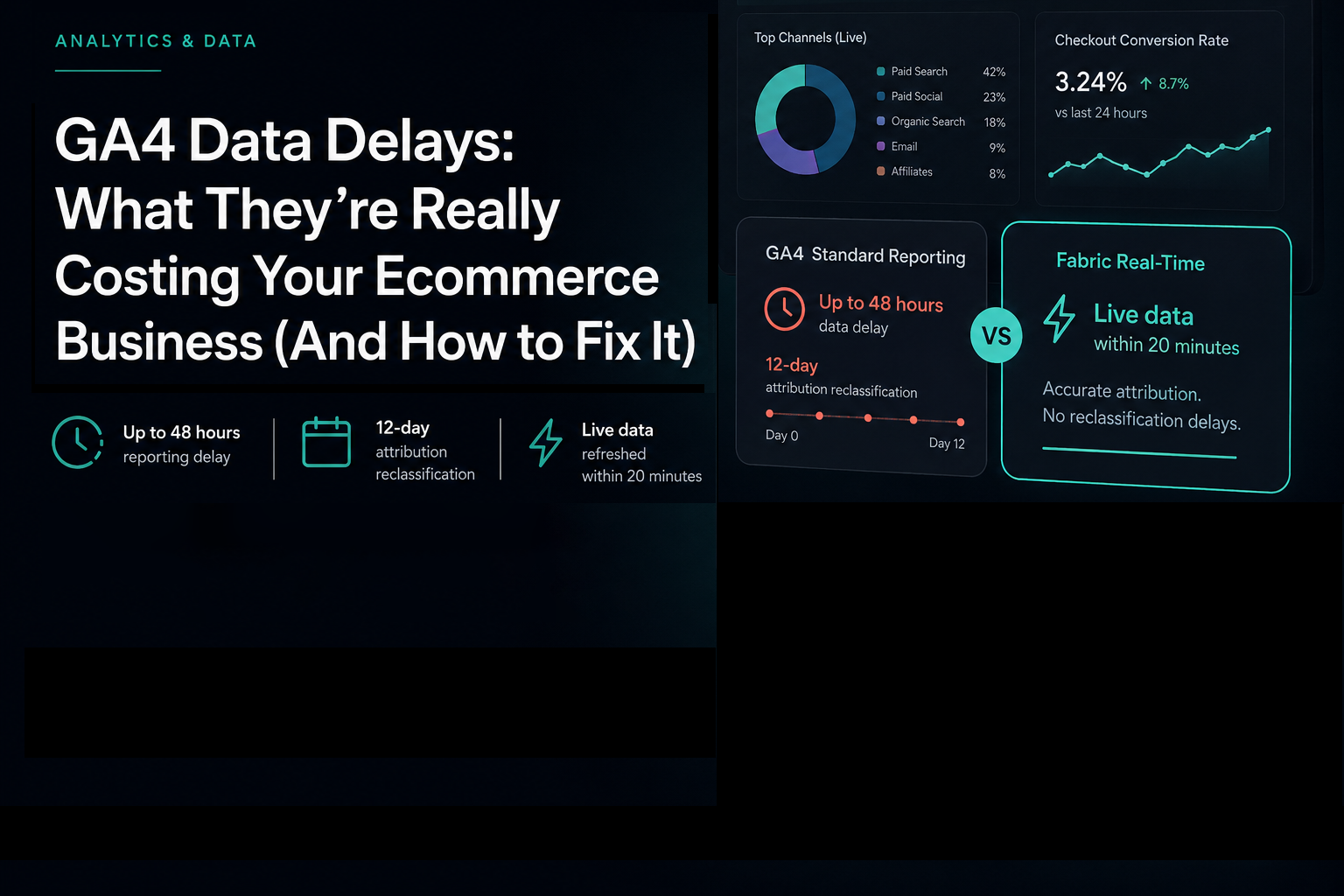
In this post we'll break down exactly what the GA4 data delays are, what they cost in practice, and how leading UK ecommerce brands are solving the problem.